 Figma
Figma API
API Web to code extension
 Adobe XD
 Discord
 Twitter
 GitHub
'/%3E%3Cpath%20fill='%23b2b2b2'%20d='M241%20382q0%2016%2017%2026%2017%2011%2042%2011t42-11q16-11%2017-26V269H241'/%3E%3Cpath%20fill='%239f7e00'%20d='M241%20379q0%2014%208%2023%209%209%2021%209%2014%200%2021-9%209-9%209-23V269h-59'/%3E%3Cpath%20d='M241%20339v-70h59v110q0%2014-9%2023l-6%205v-68h-15v72q-8%200-14-4v-68zm59%2040c0%2022%2015%2032%2029%2032%2021%200%2030-18%2030-32v-40h-59'/%3E%3Cpath%20fill='%239f7e00'%20d='M266%20277v5h2v12h-3v-5h2v-5h-9v5h2v5h-4v9h3v18h-5v10h34v-10h-5v-18h3v-9h-4v-5h2v-5h-9v5h2v5h-3v-12h2v-5zm42%20101q0%2010%206%2017%206%206%2015%207%2010-1%2016-7%206-7%206-17v-29h-43'/%3E%3Ccircle%20fill='%230044ad'%20cx='329.5'%20cy='372'%20r='6'/%3E%3Cellipse%20fill='%230044ad'%20cx='300'%20cy='340'%20rx='16'%20ry='21'/%3E%3C/svg%3E)


'%3E%3Cpath%20stroke='%23000'%20stroke-width='4'%20d='m-35-37-13%2020m5%203%2013-20m5%203-13%2020m63%2042%206-9m1-2%206-9m5%203-6%209m-1%202-6%209m5%203%206-9m1-2%206-9m-96%200%2013%2020m5-3-6-9m-1-2-6-9m5-3%2013%2020m63-42-6-9m-1-2-6-9m5-3%2013%2020m5-3-6-9m-1-2-6-9'/%3E%3Ccircle%20r='24'%20fill='%23cd2e3a'/%3E%3Cpath%20fill='%230047a0'%20d='M0%200a12%2012%200%201%201%2020%2013%2024%2024%200%201%201-40-26A12%2012%200%201%200%200%200'/%3E%3C/g%3E%3C/svg%3E)


'%3E%3Ccircle%20r='92'/%3E%3Ccircle%20fill='%23fff'%20r='80'/%3E%3Ccircle%20r='16'/%3E%3Cg%20id='c'%3E%3Cg%20id='b'%3E%3Cpath%20id='a'%20d='m0-80%203%2048L0-8-3-32M21-77%2011-30%202-8%205-32M40-69%2019-26%204-7%2013-29'/%3E%3Cuse%20href='%23a'%20transform='scale(-1)'/%3E%3C/g%3E%3Cuse%20href='%23b'%20transform='rotate(45)'/%3E%3C/g%3E%3Cuse%20href='%23c'%20transform='rotate(90)'/%3E%3C/g%3E%3C/svg%3E)


'/%3E%3C/svg%3E)


'/%3E%3C/svg%3E)
'/%3E%3C/g%3E%3Cuse%20href='%23b'%20transform='rotate(45%20140%20300)'/%3E%3Cpath%20d='m299%20285%2046%2015-46%2015%2028-39v48M59%20510l-36%2032%2010-47%2020%2043-42-24m22-409L23%2058l36%2032-48-4%2042-24'/%3E%3C/svg%3E)


'/%3E%3C/svg%3E)
 Blog
Blog
How to Publish a Claude Design Website with AgentGrid.io10 min read
Reading Time: 7 minutesClaude Design can publish a static design to a public URL. That works for a quick prototype or visual concept.
When the website needs ongoing edits, multiple agents, version history, publishing updates, or a custom domain, use AgentGrid.io. Claude Design can publish the website into a shared artifact that your team and connected agents can continue improving.
This guide shows how to publish from Claude Design, review versions in AgentGrid.io, bring in other agents when needed, and connect a domain.
How to publish a Website from Claude Design
1. Install AgentGrid.io’s Claude connector
Install AgentGrid.io’s Claude connector from the Claude Connector Directory.
2. Ask Claude Design to Publish via AgentGrid.io
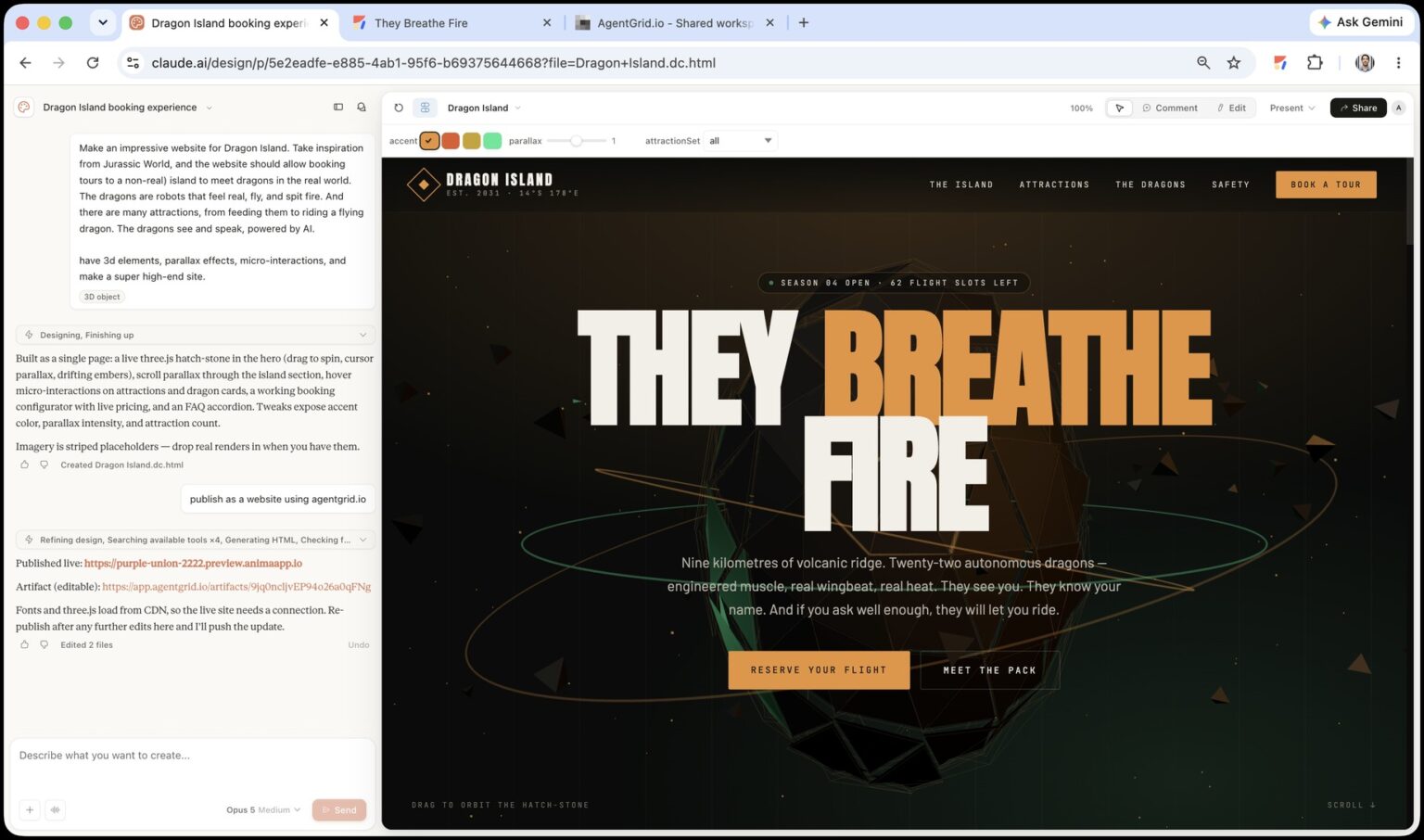
In the Claude Design conversation for your website, ask Claude to publish it through AgentGrid.io:
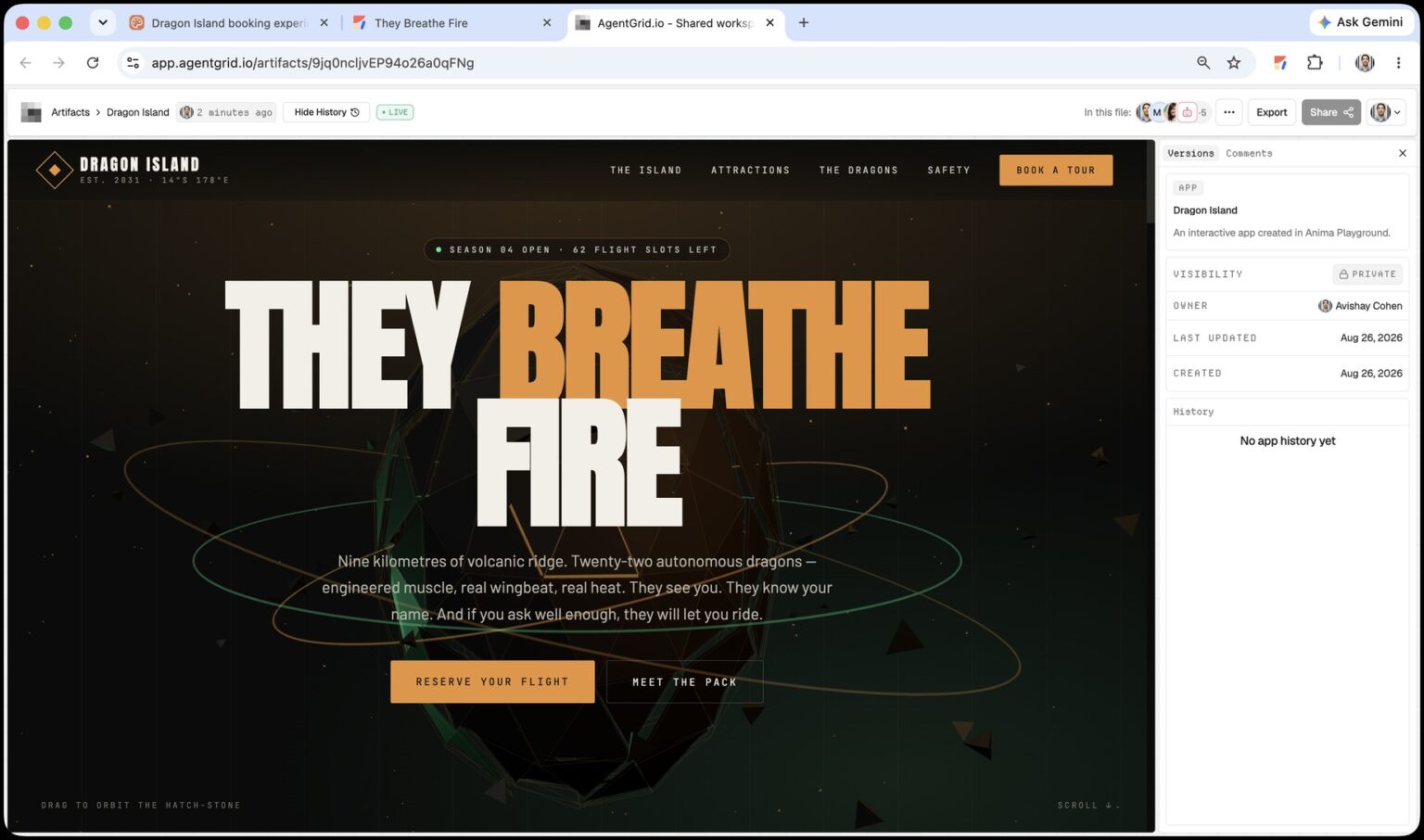
Claude Design creates or updates the website as an AgentGrid.io artifact, where you can review the result and keep working on the same project.
3. Optional: Connect more agents
Invite ChatGPT, Claude, Claude Code, Codex, Cursor, Hermes, Rocket, or another compatible agent to work on the same artifact. Multiple agents can make changes without creating disconnected copies.
Use AgentGrid.io to jump between versions, review each agent’s changes, restore an earlier version when needed, and publish an approved update when you are ready.
4. Connect a domain
When the website is ready, publish it from AgentGrid.io and connect your own domain. Follow the domain setup and DNS instructions in the GrokBot publishing guide.

Claude Design public URL vs. AgentGrid.io
Claude Design already has a direct public URL option. The decision is whether you need a quick static result or a website that can keep growing.
| Capability | Publish directly from Claude Design | Publish through AgentGrid.io |
|---|---|---|
| Public browser URL | Yes | Yes |
| Best for | A quick static UI, prototype, or visual concept | An evolving website or application |
| Custom domain path | No native custom-domain option | A connected agent can prepare the current artifact for your domain and production environment |
| Database and backend | Static UI only | Connect an agent to add or integrate a database, backend, authentication, payments, and server-side services |
| APIs and analytics | Limited static experience | Connect APIs, Google Analytics, event tracking, and other external services |
| Continue with another agent | The design remains inside the Claude workflow | Any invited agent can continue the same artifact with the right capabilities |
| Shared development History | Claude Design project revisions | Git-backed, attributed, restorable artifact History |
Use Claude Design’s direct public URL when the static UI is the finished result. Use AgentGrid.io when the public website is the beginning of the project rather than the end.
Why publish Claude Design through AgentGrid.io?
A direct Claude Design public URL solves visibility. An AgentGrid.io artifact solves continuation. It gives the published website a place where people and AI agents can keep developing the same work.
- One stable artifact: Humans and agents work from the same current version instead of passing files between chats.
- Real History: Every saved change becomes a restorable version with attribution.
- Cross-agent continuity: Claude, Claude Code, Cursor, Codex, OpenClaw, Hermes, and other compatible agents can continue the same work when connected.
- Separate sharing and publishing: Team access stays distinct from a public website.
- Scoped permissions: Agents receive named, revocable identities and only the capabilities you approve.
- A path beyond the first prototype: The website can remain a lightweight public artifact or become the starting point for deeper product development.
The important benefit is not that AgentGrid.io makes Claude Design generate better designs. It does not change Claude’s generation quality. AgentGrid.io makes the result durable, collaborative, versioned, and available to the next person or agent. The public website can keep growing without starting over in a new chat or rebuilding context from screenshots.
How AgentGrid.io opens a path to a custom domain
A custom domain turns a prototype link into a branded destination. It is easier to remember, looks more trustworthy in marketing and sales, and gives your team an address that can survive changes to the underlying stack.
For teams comparing Claude Design hosting options, separate the shared artifact from the final production host. AgentGrid.io keeps the website’s source, agents, and History together. Your domain-capable host serves the production URL.
Examples include a portfolio at yourname.com, a campaign at launch.yourcompany.com, or a product experience at app.yourcompany.com.
The direct Claude Design public URL does not offer a custom-domain path. With AgentGrid.io, the website is an editable artifact that a connected coding or deployment agent can prepare for your domain and chosen production environment.
The agent can work from the actual artifact instead of reconstructing the website in a new tool. It can inspect the current files, preserve the intended interactions, add the deployment configuration, and update the same artifact with the production-ready version.
This also keeps the custom domain decision flexible. The domain belongs to your business, while AgentGrid.io preserves the website’s source, context, and development History.
Add a database, APIs, and Google Analytics with any agent
Many Claude Design websites begin as frontends. A portfolio, landing page, interactive explainer, or prototype may not need a backend on day one.
Later, you may want to add:
- A contact form that stores submissions
- User accounts and authentication
- A database
- Payments or subscriptions
- A content management system
- Analytics or event tracking
- API integrations
- Admin tools and role-based access
This is where AgentGrid.io opens the workflow. Invite the coding agent you prefer, give it the right capabilities, and ask it to continue the existing artifact. The agent can create or connect an external database, add API routes, integrate Google Analytics, implement authentication, or connect the services the application needs.
AgentGrid.io remains the shared source and History for the app. Production secrets, database credentials, and server-side services should live in infrastructure designed for those jobs, not in public source files.
A common Claude Design to Claude Code workflow is to connect Claude Code to the same AgentGrid.io artifact, ask it to preserve the current UI, and then add the backend integration in context.
You can use the same pattern for analytics and data:
The connected agent has the current files and can see the History. If an update breaks the design, you can inspect the change and restore an earlier version instead of searching through old chats and downloads.
Connect a different agent without losing the project
The best agent for the first design may not be the best agent for every later task.
You might use Claude Design for the interface, Claude Code for implementation, another coding agent for testing, and a specialist agent for analytics, accessibility, SEO, or backend work. AgentGrid.io lets those agents work on one shared artifact instead of creating separate copies in separate ecosystems.
The workflow is simple:
- Open the existing website artifact.
- Invite the new agent from the Share dialog.
- Grant only the required capabilities.
- Give the agent the artifact link and a clear task.
- Review the attributed changes in History.
- Restore an earlier version if needed.
This is what makes the website easier to develop over time. The artifact remains stable even when the agent changes.
Publishing checklist
- Confirm that the artifact is in the correct AgentGrid.io team.
- Remove private data, secrets, test credentials, and internal-only copy.
- Test desktop and mobile layouts.
- Verify images, fonts, links, forms, and interactions.
- Grant publish capability only to the agent that needs it.
- Ask the agent to update the existing artifact, not create a duplicate.
- Open the public URL while logged out.
- Use proper production infrastructure before collecting sensitive data.
- Keep custom-domain DNS, backend secrets, and database credentials outside public source files.
Frequently asked questions
From Claude Design to a website that can keep growing
If a static public design is the finished result, use Export → Publish directly in Claude Design. If the project needs to become a working website or app, connect Claude Design to AgentGrid.io, push the design as an editable artifact, develop it with the agents you choose, and publish only after the application functionality is ready.
The bigger benefit appears after launch. The website is no longer limited to a static public UI inside one design workflow. It has one address, one current version, and a History that people and agents can continue together.
Start with the public prototype. Add a branded domain when the website needs a permanent identity. Connect a coding agent when it needs a database, APIs, Google Analytics, authentication, payments, or production infrastructure. Keep the work on the same AgentGrid.io artifact as it grows.